
Litmux Studio 0.4: robots, phone apps and Claude
Mon 19 Oct 2026
Litmux Studio 0.4 is our biggest update yet: make a phone app for your board, build and program a robot car, teach industrial robots in a physics cell, and design parts together with Claude.
App Builder: a phone app for your board
Drag switches, sliders, gauges, charts and LEDs onto a phone screen, press Set up the board for ready code for the ESP32, ESP8266 or Pico W, and control your project from litmux.tech/iot - add it to your home screen, no app store. Rules run on our server, so when the temperature passes 30 °C, switch the pump on and e-mail me works while your computer is off.
Robot Builder
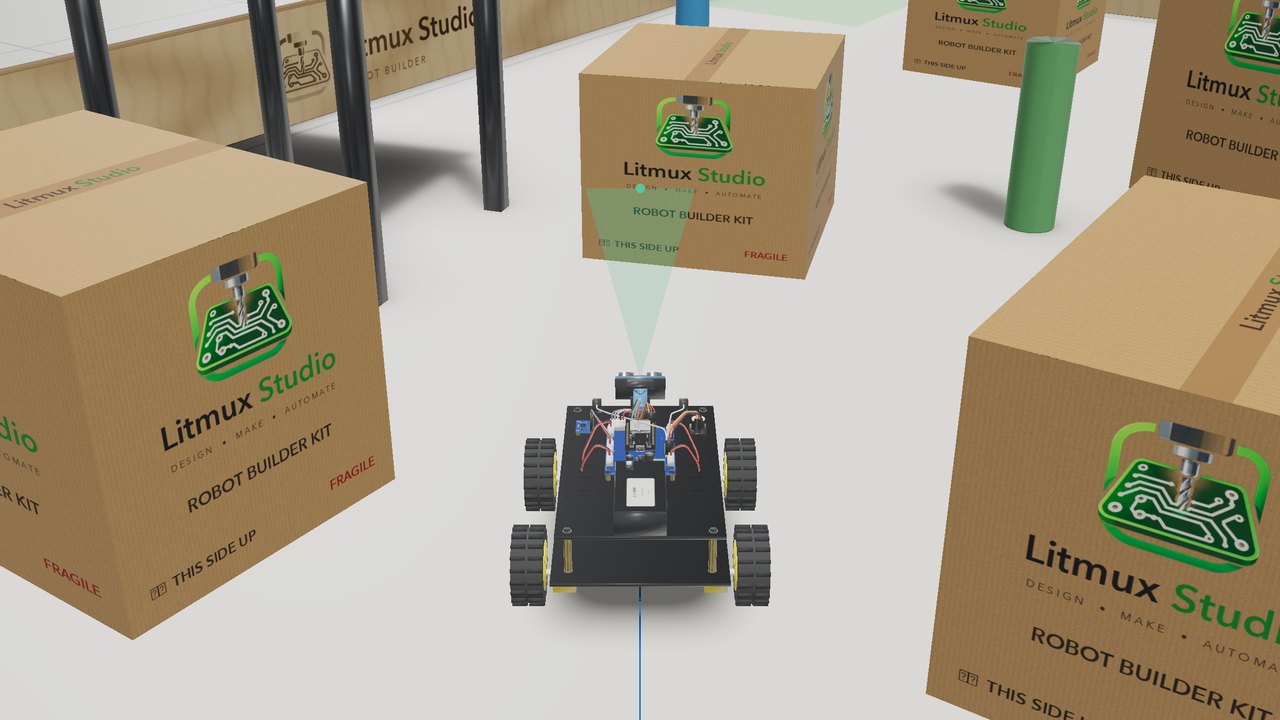
Build a robot car from the parts of the kits schools buy - the ESP32 car shield, an L298N with an ESP32 or a Pico W, mecanum wheels, tank tracks, a water pump for the firefighter, a small arm - screw by screw and cable by cable. Program it in Blocks, Arduino C or MicroPython, test it in a physics simulation with missions and stars, then put the same program on your real robot.
Robot Simulator
Industrial robots in a physics cell, in real time: a six-axis cobot, a 20 kg industrial robot and a SCARA, with a teach pendant, the robot language or Python, a conveyor, a smart camera and a force sensor. Import your own robot from URDF, and train a robot by trial and error - on your own computer, offline.
Claude inside Litmux Studio
Choose Help > Use Litmux Studio from Claude and Claude Desktop or Claude Code can use Litmux Studio's tools: model parts as a feature tree and check them in pictures, export STEP and drawing sets, build and simulate circuits, compile Arduino programs and run the robot simulator. It uses your own Claude account.
And more
STM32 Blue Pill and Black Pill boards in Electronics Studio, Automation Studio's lines in a training hall with photo-real Render, and a fresh look with the new Litmux Studio logo.